JavaScript
2020-11-22· 20min
JavaScript,运行过程中需要检查数据类型(动态语言),支持隐式类型转换(弱类型语言)
#数据类型
#基本(原始)类型
- 定义:存储在栈(stack)中的简单数据段。占据空间小、大小固定
- 如下七种:
- Boolean、String
- Undefined含义为未定义,表示 "无" 的原始值(缺少值,此处应该有一个值,但是还没有定义)
- Null含义为空对象,表示 "无" 的对象(如:作为对象原型链的终点)
- Symbol可以解决可能出现的全局变量冲突问题
- BigInt安全地存储和操作大整数
- Number双精度浮点型
- 遵循 IEEE二进制浮点数算术标准(IEE754)
- [-(2 ** 53 - 1), 2 ** 53 - 1] 范围内的整数才能在不丢失精度的情况下被表示
- 基本包装类型:在调用基本类型的属性或方法时,JavaScript 会隐式地将基本类型的值转换为对象
var s = "sss";

// 显式将基本类型转为包装类型
var o = Object(s); // String{'sss'}
// 将包装类型倒转成基本类型
var v = o.valueOf(); // sss

console.log(s, o, v);
#引用(对象)类型
- 存储在堆(heap)中的对象,在栈中存储了指针,该指针指向堆中该实体的起始地址。占据空间大、大小不固定
- 如下一种:Object 类型(Object、Array、Date、Function...)
#数据传递
- 按值传递:对于基本类型,这个值是原始值;对于引用类型,这个值是对象的内存地址(指针)
var arr = [1, 2];
function test(arr) {
  console.log(arr); // [1, 2]
  arr = [3, 4];
  for (var i = 0; i < arr.length; i++) {
    arr[i] += i;
  }
  console.log(arr); // [3, 5]
}
test(arr);
console.log(arr); // [1, 2]
#类型判断
- 类型判断的方法
- typeof用于基本类型判断(除了 null)
console.log(typeof true); // bollan console.log(typeof 1); // number console.log(typeof "ttt"); // string console.log(typeof undefined); // undefined console.log(typeof {}); // object console.log(typeof function () {}); // function // 引用类型不准确 console.log(typeof []); // object // null 类型不准确 console.log(typeof null); // object- instanceof用于引用类型判断,判断在其原型链中能否找到该类型的原型
console.log([] instanceof Array); // true console.log(function () {} instanceof Function); // true console.log({} instanceof Object); // true // PS:实现一个 instanceof function instanceof2(val, O) { while (val !== null) { // PS:实例对象的隐式原型是否等于构造函数的显式原型 if (val.__proto__ === O.prototype) return true; val = val.__proto__; } return false; } console.log(instanceof2([], Boolean), instanceof2([], Array)); // false, true // PS:对象的 constructor 属性是否指向该对象的构造函数 console.log("sss".constructor === String); // true- Object.prototype.toString.call()使用 Object 对象的原型方法 toString 来判断数据类型
let o = {}; let a = []; let s = "ssss"; console.log(Object.prototype.toString(o)); // [object Object] Object.prototype.toString.call(a).slice(8, -1); // Array // 使用 call 的原因:toString 是 Object 的原型方法,而 Array、function 等类型作为 Object 的实例,都重写了 toString 方法,会返回内部属性 [[Class]] 的值 console.log(Object.prototype.toString(a), a.toString()); // [object Object], '' console.log(Object.prototype.toString.call(a)); // [object Array] console.log(Object.prototype.toString(s), s.toString()); // [object Object], 'ssss' console.log(Object.prototype.toString.call(s)); // [object String] - 细分类型判断
- null的判断
const n1 = null; console.log(n1 === null); // true // PS: 设计的缺陷导致,最初 JS 实现,根据机器码低位标识存储变量的类型信息,null 的机器码低位标识为全 0,对象则标识为 000 // V8 Blog: null 表示 no object value,输出 object 没问题 //《JavaScript高级程序设计》: null 值表示一个空对象指针 console.log(typeof null); // 误判 object- undefined的判断
const u1 = undefined; console.log(u1 === undefined, typeof u1 === "undefined"); // true, true- NaN的判断
const n2 = NaN; console.log(isNaN(n2), Number.isNaN(NaN)); // true, true // PS:JavaScript 遵循 IEEE 754 浮点数标准,该标准规定 NaN 不等于任何值,包括它自身 console.log(NaN === NaN); // false - isNaN和Number.isNaN的区别
- isNaN会先将参数转换为数字,然后检查是否为 NaN,会有意外结果
- Number.isNaN不会进行类型转换,只在参数严格等于 NaN 时返回 true,更为精确
console.log(isNaN("ttt")); // true

console.log(Number.isNaN("ttt")); // false
console.log(Number.isNaN(NaN)); // true
- Object.is()和比较操作符===、==的区别
- Object.is()一般情况下和三等号的判断相同
// 特殊情况 console.log(Object.is(-0, +0), Object.is(NaN, NaN)); // false, true- ==如果两边的类型不一致,则会进行强制类型转化后再进行比较
- ===如果两边的类型不一致,直接返回 false
#事件流
- DOM 事件传递机制/事件流:由于 DOM 是一个树结构,如果在父子节点绑定事件时候,当触发子节点的时候,会有一个顺序,即事件流的三个阶段:事件捕获阶段(Capturing phase) <-> 处于目标阶段(Target phase) <-> 事件冒泡阶段(Bubbling phase)
- 事件(从window)向下走近目标节点;(捕获,建立传播路径)
- 途中经过各个层次的DOM节点,并在各节点上触发捕获事件,直到到达事件的目标节点;
- 然后逐级向上冒泡,并将事件一直冒泡到 window(冒泡,回溯传播路径)
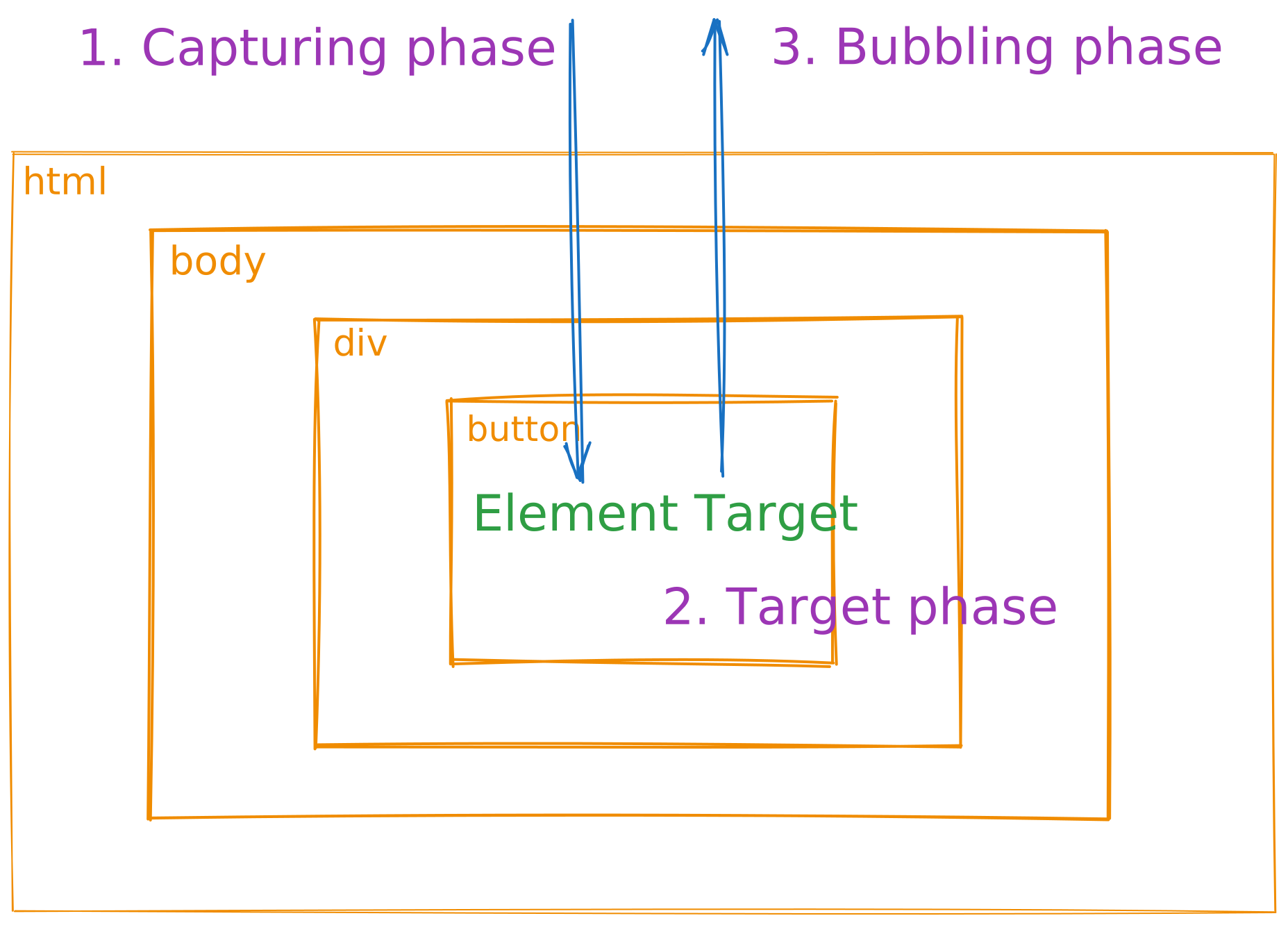
- 然后逐级向上冒泡,并将事件一直冒泡到 window(冒泡,回溯传播路径)
- 事件模型
- 原始事件模型
- 只支持冒泡,不支持捕获
- 同一个类型的事件只能绑定一次(多次绑定会覆盖)
var fun = function() { console.log('fun#click') } // html直接绑定 <button class="btn" onclick="fun()"> // js绑定 var btn = document.querySelector('.btn'); btn.onclick = fun; // 取消则 btn.onclick = null- 标准事件模型
- 会经过如上述三个阶段
// 监听事件 addEventListener(eventType, handler, useCapture); // 默认useCapture为false,即默认是冒泡阶段 // 移除事件 removeEventListener(eventType, handler, useCapture); // html <div class="div"> <button class="btn">CLICK</button> </div>; var divEl = document.querySelector(".div"); var btnEl = document.querySelector(".btn"); function fn(event) { console.log( `阶段:${event.eventPhase} - 元素:${event.currentTarget.tagName}`, ); } divEl.addEventListener("click", fn); btnEl.addEventListener("click", fn); // 阶段:3 - 元素 BUTTON // 阶段:3 - 元素 DIV - 原始事件模型
#ES6
#var 和 let、const
- let、const 具有块级作用域,解决了两个问题:内层变量可能覆盖外层变量、用来计数的循环变量泄漏为全局变量
- var存在变量提升(let、const保提升了创建过程,没有提升初始化和赋值过程)
- 提升是指 JS 解释器将所有变量和函数声明移动到当前作用域顶部的操作,提升有两种类型:变量提升、函数提升
- 在 let、const 声明之前调用,会报错 Cannot access 'xx' before initialization,在语法上叫 暂时性死区 (TDZ,Temporal Dead Zone)
- const、let 不允许重复声明变量
- const 声明变量必须设置初始值(var、let可不用)
- let 可以重新赋值也就可以更改指针指向、const 则不允许
#rest
- 它允许函数接受不定数量的参数,并将这些参数作为数组处理,使得处理可变参数的函数变得更加简洁和灵活
- 使用 ... 作为前缀,像扩展运算符的逆过程(填充到数组,而不是展开数组)
function sum(...args) {
  return args.reduce((acc, curr) => acc + curr, 0);
}

console.log(sum(1, 2, 3)); // 6
- 与 arguments 对象的区别:
- arguments 对象是一个类数组对象,包含了传递给函数的所有参数,但它不是一个真正的数组,不能直接使用数组的方法
#箭头函数
- 写法比普通函数简洁
- 没有自己的 this,且 this 指向定义时所在的对象(从父作用域中继承 this),而不是使用时所在的对象(故 call、bind、apply 不好使)
- 不能作为构造函数使用
- 没有自己的 arguments
- 没有 prototype
- 不能用作 Generator 函数,不能使用 yeild 关键字
#Symbol
- 可用作对象中惟一的属性名、避免不同的模块属性的冲突
let s1 = Symbol("sss");
let s2 = Symbol("sss");
console.log(s1, typeof s1, s1 === s2); // Symbol('sss'), symbol, false
#for...in
- 会遍历数组所有的可枚举属性,包括原型
- 遍历顺序有可能不是按照实际数组的内部顺序
- 遍历的数组索引类型为字符串,不能直接进行几何运算
// 例1
var badge = { s: 1 };
function CC() {
  this.color = "blue";
}
CC.prototype = badge;
var c1 = new CC();

for (var k in c1) {
  if (c1.hasOwnProperty(k)) {
    console.log(`c1.${k} = ${c1[k]}`); // c1.color = blue
  }
  console.log(`c1.${k}`); // c1.color、c1.s
}

// 例2
var arr = [1, 2];
Array.prototype.tt = 12;
for (let index in arr) {
  console.log(arr[index]); //1 2 12
  // 索引会变为字符串型数字
  console.log(index + 1); // 01 11 tt1
}

// 例3
for (let index in arr) {
  // hasOwnProperty()方法可以判断某属性是不是该对象的实例属性
  if (arr.hasOwnProperty(index)) {
    console.log(arr[index]); // 1 2
  }
}
#for...of
- 遍历数组元素值(仅数组内的元素,不包括原型属性或索引)
- 可遍历:拥有 Symbol.iterator 属性的数据结构
- 字符串、数组、Set、Map、类数组(如arguments对象)、DOM NodeList 对象、Generator 对象(但不能遍历对象,因为没有迭代器对象)
- Symbol.iterator:表示一个对象所具有的默认迭代器函数,可以用于自定义迭代器的实现
// 数组
var a1 = [1, 2];
for (let a of a1) {
  console.log(a); // 1 2
}

// arguments对象
function test1() {
  for (let a of arguments) {
    console.log(a);
  }
}
test1(1, 2); // 1 2

// 字符串
var s1 = "sss";
for (let s of s1) {
  console.log(s); // s s s
}
- 使用 for...of 实现遍历对象(给对象添加 Symbol.iterator 属性)
var oo1 = {
  s: "111",
  s2: "222",
  // 定义生成器函数
  [Symbol.iterator]: function* () {
    // 循环每次调用生成器的 next() 方法
    for (let key of Object.keys(this)) {
      // 暂停生成器函数的执行,并返回当前属性的键值对
      // yield 关键字使生成器函数可以暂停执行,并在后续调用 next() 方法时恢复
      yield [key, this[key]];
    }
  },
};

for (let [key, value] of oo1) {
  console.log(`${key}: ${value}`); // s: 111, s2: 222
}
#ESModule 和 CommonJS 模块
- CommonJS
- 运行时加载(加载的是一个对象,只有在脚本运行结束时才会生成)
- 输出的是一个值的拷贝:可以重新赋值,可以修改指针指向
// lib.js
var num = 3;
function addFn() {
  num++;
}
module.exports = {
  num: num,
  addFn: addFn,
};

// main.js
var lib = require("./lib.js");
console.log(lib.num); // 3
lib.addFn();
console.log(lib.num); // 3
- ESModule
- 编译时输出接口(对外接口只是一种静态定义,在代码静态解析阶段就会生成)
- 输出的是值的引用:不能重新赋值(即不能修改其变量的指针指向)但可以改变内部属性的值
// lib.js
export let num = 3;
export function addFn() {
  num++;
}

// main.js
import { num, addFn } from "./lib.js";
console.log(num); // 3
addFn();
console.log(num); // 4
#类数组对象
- 只包含使用从 0 开始且自然递增的整数做键名,并且定义了 length 表示元素个数的对象
- 常见的类数组对象:arguments 、 DOM 方法的返回结果、函数参数(含有 length 属性值,代表可接收的参数个数)
// 类数组对象 -> 数组
function test() {
  const arrArgs = [...arguments];
  arrArgs.forEach((n) => console.log(n));

  console.log(
    `[...arguments]: ${[...arguments]}`,
    `Array.from(arguments): ${Array.from(arguments)}`,
    `Array.prototype.concat.apply([], arguments): ${Array.prototype.concat.apply([], arguments)}`,
    `Array.prototype.slice.call(arguments): ${Array.prototype.slice.call(arguments)}`,
    `[].slice.call(arguments): ${[].slice.call(arguments)}`,
    `Array.prototype.splice.call(arguments, 0): ${Array.prototype.splice.call(arguments, 0)}`,
  );
}
test(1, 2, 3); // 1,2,3

// 数组 -> 类数组对象
var arr = [4, 5];
console.log({ ...arr }, Object.assign({}, arr)); // { 0: 4, 1: 5 }
#IIFE
- IIFE(Immediately-Invoked Function Expression),即立即执行函数、匿名立即执行函数
- 使用此模式来避免污染全局命名空间
(function IIFE() {
  var s2 = "ssss";
  console.log(s2); // ssss
})();
console.log(s2); // ReferenceError: s2 is not defined
#use strict
- 在 JavaScript1.8.5 (ECMAScript5) 中新增,不是一条语句,是一个字面量表达式
- 目的:指定代码在严格条件下执行
- 禁止使用 with 语句
- 禁止 this 关键字指向全局对象
- 对象不能有重名的属性
#0.1 + 0.2 !== 0.3
let n1 = 0.1;
let n2 = 0.2;
console.log(n1 + n2); // 0.3 0000 0000 0000 0004
- 原因
- Number 类型 遵循 IEEE二进制浮点数算术标准(IEE754),存储 64 bit 双精度,能够表示 2^64 个数
- 浮点数是无穷的,代表有些浮点数必会有精度的损失,0.1、0.2 表示为二进制会有精度的损失,故无限循环二进制转换为十进制会出现误差
- 解决
- 将小数 * 10 ** 𝑛,转换为整数,整数不存在精度丢失问题,再转浮点数
- 将数字转换为字符串,字符串逐位相加得到精确的结果
class Mclass { // 方法1 static add(n1, n2) { const factor = 10 ** Math.max( n1.toString().split(".")[1]?.length || 0, n2.toString().split(".")[1]?.length || 0, ); return (n1 * factor + n2 * factor) / factor; } // 减法 static sub(n1, n2) { return Mclass.add(n1, -n2); } // 方法2 static add2(n1, n2) { let [n1Int, n1Dec] = n1.toString().split("."); let [n2Int, n2Dec] = n2.toString().split("."); n1Dec = n1Dec || "0"; n2Dec = n2Dec || "0"; const maxDecLength = Math.max(n1Dec.length, n2Dec.length); n1Dec = n1Dec.padEnd(maxDecLength, "0"); n2Dec = n2Dec.padEnd(maxDecLength, "0"); const intSum = BigInt(n1Int) + BigInt(n2Int); const decSum = BigInt(n1Dec) + BigInt(n2Dec); let decSumStr = decSum.toString().padStart(maxDecLength, "0"); if (decSumStr.length > maxDecLength) { const carry = BigInt( decSumStr.slice(0, decSumStr.length - maxDecLength), ); const newIntSum = intSum + carry; decSumStr = decSumStr.slice(-maxDecLength); return Number(newIntSum.toString() + "." + decSumStr); } else { return Number(intSum.toString() + "." + decSumStr); } } // 乘法 static mul(n1, n2) { let pow = 0; const s1 = n1.toString(); const s2 = n2.toString(); pow += s1.split(".")[1].length; pow += s2.split(".")[1].length; return ( (Number(s1.replace(".", "")) * Number(s2.replace(".", ""))) / Math.pow(10, pow) ); } // 除法 static div(n1, n2) { let pow1 = 0; let pow2 = 0; let nn1, nn2; const s1 = n1.toString(); const s2 = n2.toString(); pow1 += s1.split(".")[1].length; pow2 += s2.split(".")[1].length; nn1 = Number(s1.replace(".", "")); nn2 = Number(s2.replace(".", "")); if (pow1 > pow2) nn2 = nn2 * Math.pow(10, pow1 - pow2); if (pow2 > pow1) nn1 = nn1 * Math.pow(10, pow2 - pow1); return nn1 / nn2; } } console.log(`Mclass.add: 0.111 + 0.9 = ${Mclass.add(0.111, 0.9)}`); // 1.011 console.log(`Mclass.add: 0.1 + 0.2 = ${Mclass.add(0.1, 0.2)}`); // 0.3 console.log(`Mclass.sub: 0.3 + 0.1 = ${Mclass.sub(0.3, 0.1)}`); // 0.2 console.log(`Mclass.mul: 0.14 * 0.1 = ${Mclass.mul(0.14, 0.1)}`); // 0.014 console.log(`Mclass.div: 0.14 / 0.1 = ${Mclass.div(0.14, 0.1)}`); // 1.4 console.log(`Mclass.add2: 0.111 + 0.9 = ${Mclass.add2(0.111, 0.9)}`); // 1.011 console.log(`Mclass.add2: 0.1 + 0.2 = ${Mclass.add2(0.1, 0.2)}`); // 0.3- 第三方库:Math.js、BigDecimal.js等
- 使用 Number.EPSILON(值为2 ** -52)作为误差判断
function isEqual(a, b) {
  return Math.abs(a - b) < Number.EPSILON;
}
console.log(isEqual(0.1 + 0.2, 0.3));
#类型转换机制
#隐式转换
// 比较运算(==、!=、>、<)、需要布尔值地方
"2" > "10"; // true,因 '2'.charCodeAt()为50,'10'.charCodeAt()为49
"2" > 10; // false
[] == 0; // true,[].valueOf().toString()为空字符串 -> Number("") -> 0
![] == 0; // true,先执行![] 逻辑运算 > 比较运算 -> false -> 0
[] == []; // false,引用地址不一样

// 算术运算(+、-、*、/、%)
"2" + "3"; // "23"
"2" - "1"; // 1
"2" + function () {}; // "2function (){}"
#显式转换
Number(undefined); // NaN
Number(Null); // 0
Number(false); // 0
Number([1, 2]); // NaN
Number([1]); // 1

String({ k: 1 }); // "[object Object]"
String([1, 2]); // "1,2"

Boolean(NaN); // false

parseInt("1a2"); // 1
#toString和valueOf
- 两者区别
- 在使用操作符时都会被调用(隐式转换)
- 二者并存的情况下,数值运算会优先调用 valueOf、字符串运算优先 toString
class CC {
  valueOf() {
    return 1;
  }
  toString() {
    return "sss";
  }
}
var cc = new CC();
console.log(Number(cc)); // 1
console.log(String(cc)); // sss
#tostring
- 返回一个表示该对象的字符串
- 自动调用:使用操作符的时候,如果其中一边为对象,则会先调用 toSting 方法(隐式转换)
- 主动调用
var o = {};
console.log(o.toString()); // [object Object]

var a = [];
console.log(a.toString()); //
var a2 = [1, 2];
console.log(a2.toString()); // 1,2

var fn = function () {};
console.log(fn.toString()); // function () {}
#vauleOf
- 返回当前对象的原始值
- 主动调用
var o = {};
console.log(o.valueOf()); // {}

var a = [];
console.log(a.valueOf()); // []
#多维数组扁平化
var a = [1, 2, [3], [4, [5]]];

// 方式一
console.log(a.flat(Infinity)); // [1, 2, 3, 4, 5]

// 方式二
function ff(arr) {
  return arr.reduce((acc, cur) => {
    return acc.concat(Array.isArray(cur) ? ff(cur) : cur);
  }, []);
}
console.log(ff(a)); // [1, 2, 3, 4, 5]

// 方式三
function ff2(arr) {
  return arr
    .toString()
    .split(",")
    .map((i) => Number(i));
}
console.log(ff2(a)); // [1, 2, 3, 4, 5]
#小数取整
console.log(Math.ceil(24.2)); // 25 向上舍入
console.log(Math.floor(24.8)); // 24 向下舍入
console.log(Math.round(24.8)); // 25 四舍五入
#数组方法
- 判断数组
var a = [1, 2];

// 方式1: isArray
console.log(Array.isArray(a)); // true

// 方式2: toString 方法会返回一个表示该对象的字符串
console.log(Object.prototype.toString.call(a)); // [object Array]

// 方式3: instanceof 判断构造函数的 prototype 属性是否出现在实例的原型链上
console.log(a instanceof Array); // true

// 方式4: isPrototypeOf() 用于测试一个对象是否存在于另一个对象的原型链上
console.log(Array.prototype.isPrototypeOf(a)); // true

// 方式5: Object 的每个实例都有构造函数 constructor,用于保存着用于创建当前对象的函数
console.log(a.constructor === Array); // true
- 改变原数组:push、unshift、pop、shift、sort、splice、reverse
// push: 添加到末尾(返回最新长度)
var a1 = ["1", "2"];
console.log(a1.push("3", "4"), a1); // 4, ['1', '2', '3', '4']

// unshift: 添加到开头(返回最新长度)
var a2 = ["1", "2"];
console.log(a2.unshift("3", "4"), a2); // 4, ['3', '4', '1', '2']

// pop: 删除最后一项(返回被删项)
var a3 = ["1", "2"];
console.log(a3.pop(), a3); // 2, ['1']

// shift: 删除第一项(返回被删项)
var a4 = ["1", "2"];
console.log(a4.pop(), a4); // 1, ['2']

// sort: 根据字符串Unicode码默认排序(返回数组)
var a5 = ["2", "3", "1"];
console.log(a5.sort(), a5); //  ['1', '2', '3']  ['1', '2', '3']
console.log(a5.sort((a, b) => b - a)); //  ['3', '2', '1']

// splice(开始位置, 删除数量, 插入元素...)、(返回删除元素)
var a6 = ["1", "2"];
console.log(a6.splice(1, 1, "3"), a6); // ['2']  ['1', '3']

// reverse: 反转数组(返回数组)
var a7 = ["1", "2"];
console.log(a7.reverse(), a7); // ['2', '1']  ['2', '1']
- 不改变原数组:concat、join、reduce、map、forEach、filter、slice、findIndex
// concat: 合并数组(返回新数组)
var a8 = ["1", "2"];
console.log(a8.concat("3", ["4"]), a8); // ["1", "2", "3", "4"]  ['1', '2']

// join(字符串分隔符)、(返回字符串)
var a9 = ["1", "2"];
console.log(a9.join("-"), a9); // 1-2  ['1', '2']

// reduce: 未提供初始值,仅从索引 1 开始执行 callback
var a10 = [0, 1, 2];
var a11 = a10.reduce(function (accumulator, currentValue, currentIndex, array) {
  return accumulator + currentValue;
}); // callback被调用两次
console.log(a11, a10); // 3 [0, 1, 2]

// slice(start(包括该元素) 到 end (不包括该元素))、(返回新数组)
var a12 = ["a", "b", "c", "d", "e"];
console.log(a12.slice(0, 2), a12.slice(-3), a12); // ["a", "b"]、["c", "d", "e"]、["a", "b", "c", "d", "e"]
#reduce应用
- reduce(accumulator, currentValue, currentIndex, array)
// 计算元素次数
var a2 = ["a", "b", "c", "b", "a"];
function ff(arr) {
  return arr.reduce((acc, cur) => {
    if (!acc[cur]) acc[cur] = 1;
    else acc[cur]++;
    return acc;
  }, {});
}
console.log(ff(a2)); // { a: 2, b: 2, c: 1 }

// 分组
var a3 = [
  { n: "a", m: 1 },
  { n: "b", m: 2 },
  { n: "c", m: 1 },
];

function ff2(arr, field) {
  return arr.reduce((acc, cur) => {
    var val = cur[field];
    if (!acc[val]) {
      acc[val] = [];
    }
    acc[val].push(cur);
    return acc;
  }, {});
}
console.log(ff2(a3, "m")); // { "1": [{ "n": "a", "m": 1 }, { "n": "c", "m": 1 } ], "2": [{ "n": "b", "m": 2 }] }

// 累加值
function ff3(arr, field) {
  return arr.reduce((acc, cur) => {
    return (acc += cur.m);
  }, 0);
}
console.log(ff3(a3)); // 4
#集合(Set)
- 具有某种特定性质的事物的总体,具有三大特性:确定性、无序性、互异性
var se = new Set();
console.log(se.add(6).add(6)); // Set(1) {6}
console.log(se.delete(6)); // true
console.log(se.has(6)); // false
console.log(se.clear()); //

// 并集
var se1 = new Set([2, 6]);
var se2 = new Set([4, 6]);
console.log(new Set([...se1, ...se2])); // Set(3) {2, 6, 4}

// 交集
console.log(new Set([...se1].filter((i) => se2.has(i)))); // Set(1) {6}

// 差集 (se1 相对于 se2)
console.log(new Set([...se1].filter((i) => !se2.has(i)))); // Set(1) {2}
#阻止冒泡和取消默认事件
function stopBubble(e) {
  if (e && e.stopPropagation) e.stopPropagation();
  else window.event.cancelBubble = true;
}

//阻止浏览器的默认行为
function stopDefault(e) {
  if (e && e.preventDefault) e.preventDefault();
  else window.event.returnValue = false;
  return false;
}
#页面生命周期
Ref: 参考
- DOMContentLoaded:浏览器已完全加载 HTML,并构建了 DOM 树
- load:浏览器不仅加载完成了 HTML,还加载完成了所有外部资源
- beforeunload/unload:当用户正在离开页面时
// 多次调用会覆盖
window.onload = function () {
  console.log("All source ready");
};

// 比上方好,可多次监听
function addLoadEvent(fn) {
  if (document.all) {
    window.attachEvent("onload", fn); // IE
  } else {
    window.addEventListener("load", fn, false); // false: 在事件冒泡阶段执行
  }
}

document.addEventListener("DOMContentLoaded", function () {
  console.log("DOM ready");
});
- DOMContentLoaded和脚本
- 阻塞情况:遇到 <script> 标签时,会在继续构建 DOM 之前运行它
- 不会阻塞的情况:
- 具有 async 特性(attribute)的脚本
- 使用 document.createElement('script') 动态生成并添加到网页的脚本
<script>
  document.addEventListener("DOMContentLoaded", () => {
    alert("DOM ready");
  });
</script>

<script>
  alert("Inline script executed");
</script>
- onunload
// 当用户要离开的时候,我们希望通过 unload 事件将数据保存到我们的服务器上。
// 有一个特殊的 navigator.sendBeacon(url, data) 方法可以满足这种需求,详见规范 https://w3c.github.io/beacon/。
// 它在后台发送数据,转换到另外一个页面不会有延迟:浏览器离开页面,但仍然在执行 sendBeacon。

let analyticsData = {
  /* 带有收集的数据的对象 */
};

window.addEventListener("unload", function () {
  navigator.sendBeacon("/analytics", JSON.stringify(analyticsData));
});

// 请求以 POST 方式发送。
// 我们不仅能发送字符串,还能发送表单以及其他格式的数据,通常它是一个字符串化的对象。
// 数据大小限制在 64kb。
#防抖和节流
- 区别:防抖在连续的事件周期结束时执行一次,节流会在事件周期内按间隔时间有规律的执行多次
#防抖
- 触发事件后 n 秒后才执行函数,如果在 n 秒内又触发了事件,则会重新计算函数执行时间
- 场景:用户停止输入后搜索/验证、如按钮多次点击、输入框搜索、窗口大小调整等
var debounce = (fn, delay) => {
  let timeoutId;
  return (...args) => {
    clearTimeout(timeoutId);
    timeoutId = setTimeout(() => fn.apply(this, args), delay);
  };
};
window.addEventListener(
  "resize",
  debounce(() => console.log("窗口resize"), 1000),
);

// var handleInput = debounce(() => {
//   console.log("Click");
// }, 300);
// document.getElementById("btn").addEventListener("click", debouncedHandler);
#节流
- 连续触发事件时,在 n 秒中只执行一次函数
- 场景:如滚动监听、鼠标移动等
var throttle = (fn, delay) => {
  let lastTime = 0;
  return (...args) => {
    let now = +new Date();
    if (now - lastTime >= delay) {
      fn.apply(this, args);
      lastTime = now;
    }
  };
};

window.addEventListener(
  "scroll",
  throttle(() => {
    console.log("页面滚动");
  }, 1000),
);